Place Your Ads Here!
Tampilkan postingan dengan label Operating System. Tampilkan semua postingan

Senin, 26 Maret 2012

XUS Desktop Professional Edition 1.7.72

XUS Desktop Professional Edition 1.7.72
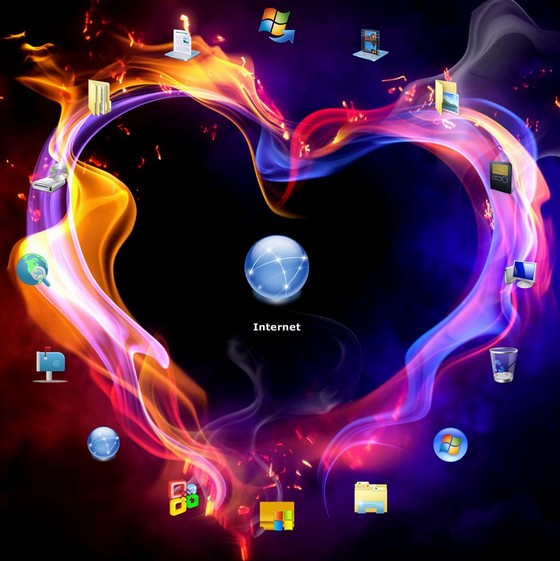
XUS Desktop Professional Edition 1.7.72. XUS Desktop Professional Edition 1.7.72 adalah Sebuah Software Yang Bisa Membantu Kamu Mengatur Icon Di Windows. XUS Desktop Professional Edition 1.7.72 Ini Berguna Banget Buat Kamu Deh..

XUS Desktop Professional Edition 1.7.72 Ini Bisa Membuat Desktop Menjadi Kelihatan Lebih Menarik! Tapi Itu Tergantung Kamu Juga Gimana Cara Kamu Mengatur Desktop Dengan XUS Desktop Professional Edition 1.7.72. Selamat Mencoba!

Feature Of XUS Desktop Professional Edition 1.7.72 :

Easy to organize your windows desktop iconsFast & swift way to launch the programMake you windows desktop clear and beautifulOffers a different & wonderful feel to use your computerMore useful and helpful functionsOffers a perfect solution to handle too much desktop icon's problem
Download Link For XUS Desktop Professional Edition 1.7.72 :
XUS Desktop Professional Edition 1.7.72
Password: XUS Desktop Professional Edition 1.7.72

Selamat Menggunakan XUS Desktop Professional Edition 1.7.72 ^_^;

Rabu, 14 Maret 2012

VirtualBox 4.1.10.76795 Final Multilanguage

VirtualBox 4.1.10.76795 Final Multilanguage
VirtualBox 4.1.10.76795 Final Multilanguage. VirtualBox 4.1.10.76795 Final Multilanguage
adalah Software Yang Dapat Kamu Gunakan Untuk Menginstall Beberapa Operating System
Ke Dalam Satu Komputer Secara Virtual. VirtualBox 4.1.10.76795 Final Multilanguage
Ini Sudah Di Lengkapi Dengan Banyak Bahasa.

Change On VirtualBox 4.1.10.76795 Final Multilanguage :
GUI: if 3D support on the host is not available for some reason, do not only disable this VM setting but also uncheck the checkbox
VMM: fixed a potential problem causing to schedule interrupts during SYSEXIT right after STI
VMM: fixed a potential guest memory corruption issue with page fusion
VMM: adjusted the module matching algorithm for page fusion a little, generally resulting in slightly more shared pages
Main: host interfaces no longer have "defaults" for IP address and network mask attributes
Main: don't depend on a password for certain guest control operations (bug # 10030)
3D Support: fixed Windows XP hosts support (4.1.8 regression; bugs # 10071 and # 10088)
3D Support: rendering fixes for Linux hosts with NVIDIA graphics
3D Support: fixed saved state issues (4.1.8 regression; bug # 10126)
3D Support: WDDM driver: fixed powershell_ise crashes (bug # 10167), make WPF-based apps work with Aero enabled, fixed additional possible WinSAT crashes
VRDP: fixed remote clipboard compatibility issues with some clients
Storage: fixed a possible data corruption when compacting VDI or VHD images with snapshots (32-bit hosts only)
ISCSI: fixed crash when using incorrect credentials when authenticating with a LIO target (bug # 10173)
Serial: don't abort in host mode under rare error conditions (non-Windows hosts only)
SDK: actually ship current C bindings
SDK: fixed the Java glue code for JDK 1.7.0 (bug # 9848)
SDK: added Python example
Metrics: make metrics collection more robust regarding blocked VMs
Web service: added SSL / TLS support
VBoxShell: fixed Guest Additions information lookup
Solaris installer: fixed dependency checking while installing VirtualBox in a zone
Linux hosts / guests: Linux 3.3-rc1 compile fixes
Solaris hosts: fixed debug kernel panics while opening module CTF data (bug # 9591)
Mac OS X hosts: fixed Python support on Lion
Linux Additions: make 3D passthrough work on OL / RHEL 6.2 (bug # 10010)
Linux Additions: fixed missing implementation when copying shared folder data through kernel high memory (bug # 9878)
Linux Additions: make sure all data is written when closing a memory mapped file on a shared folder
Linux Additions: added support for X.Org Server 1.12
Solaris Additions: fixed guest kernel driver to load properly on guest reboot (4.1.8 regression; bug # 10113)
Solaris Additions: fixed missing 64-bit OpenGL library VBoxOGL.so (bug # 10151)
Solaris Additions: fixed VBoxService import and start for Solaris 11 guests.
Windows Additions: some Windows 8 adaptions
Windows Additions: several fixes for shared folders (bug # 9753)
Guest control: miscellaneous bugfixes

Download Link For VirtualBox 4.1.10.76795 Final Multilanguage :
Password: VirtualBox 4.1.10.76795 Final Multilanguage

Selamat Menggunakan VirtualBox 4.1.10.76795 Final Multilanguage ^_^;

Rabu, 29 Februari 2012

Advanced System Optimizer 3

Advanced System Optimizer 3
Advanced System Optimizer 3. Advanced System Optimizer 3 Adalah Software
Yang Dapat Membantu Kita Untuk Melakukan Optimasi Pada Komputer Kita.
Advanced System Optimizer 3 Ini Cukup Membuat Aku Tercengang Dengan
Fiturnya yang Lengkap.

Advanced System Optimizer 3 Ini Fiturnya Banyak N Lengkap Dh... Yang
Paling Aku Suka Game Optimizer Sama Memory Optimizer. Advanced System Optimizer 3 Ini Bisa Mengoptimalkan RAM Kita Sehingga Gak Lag Saat
Bermain Game!

Screensut For Advanced System Optimizer 3 :

Advanced System Optimizer 3
Download Link For Advanced System Optimizer 3 :
Advanced System Optimizer 3
Password: Advanced System Optimizer 3

Selamat Menikmati Advanced System Optimizer 3 ^_^;

Jumat, 23 Desember 2011

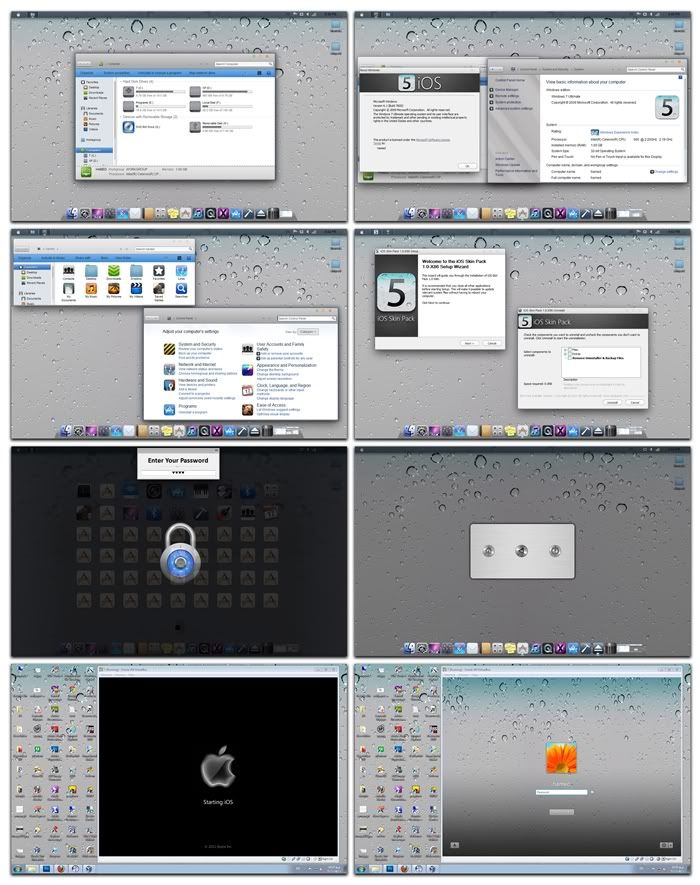
IOS SKINPACK for Windows 7

Langsung Aja Ya Aku Share IOS SKINPACK for Windows 7
Ini Sesuai janji Ku Yang Kemaren...
Yang Bakal Share Skinpack Selama 1 Minggu Ini...
Ok... Langsung Aja...

Pada Tau Gak IOS SKINPACK Itu Apa?
Ini Skinpack Buat Windows 7 Yang Udah Di Modip
Biar Bisa Semirip Mungkin Dengan IOS

Tapi Aku Gak Tau Juga IOS Itu Apa Sih..
Hehehehehe ._.V

Nah Sekarang Untuk Penampakannya

System Reqruitmensnya IOS SKINPACK Ini Sama Kok Kayak Kemaren...
  • OS: Windows 7, Windows 7 SP1[All Version]

Sekarang Program Built-in Di IOS SKINPACK
  • Resource Hacker 3.6
  • Moveex 1.0
  • Universal Theme Patcher 1.5.0.22
  • Win7BootUpdater v0 Beta 1 
  • RocketDock 1.3.5 
  • UberIcon 1.0.4 
  • Y'z Shadow 2.3 beta3 
  • Icon
  • Boot 
  • Theme 
  • Skin Pack Toolbar
Keliatannya IOS SKINPACK Ini Lebih Dikit Yah Program Built-innya...
Dibanding.. Yang Kemaren...

Link Download IOS SKINPACK:

ION SKINPACK Online Istaller With Auto Fix Bug (Recommended)
32Bit: Download
64Bit: Download

IOS SKINPACK Offline Installer
32 Bit: Download
64 Bit: Download

Selamat Menikmati IOS SKINPACK for Windows 7 :)

Kaskus Skin Pack for Windows 7

Langsung Aku Copas Dari Kaskus Ya... :)

Quote:
Support Hanya Di OS Windows 7 dan Windows Server 2008 R2 
tidak support OS Windows 8 DP 8102 
New (Icon and Wallpaper, Logon Screen, Boot Screen etc) Di Kaskus Skin Pack untuk Windows 7 bisa 

ni screenshot nya
Spoiler for ss


New Kaskus Skin Pack on tested in Windows 7 SP1 
Spoiler for after complete


Instal Kaskus Skin Pack Di saat Windows 7 
Spoiler for ss (Run Kaskus Skin Pack 1.0 For Windows 7 x86)


Download Link From DA and IDWS (selesai upload )
Spoiler for link
Code:
32bit (x86)
http://leothink.deviantart.com/art/Kaskus-Skin-Pack-1-0-x86-273161253
or
http://idws.us/bbdfjef
Code:
64bit (x64)
http://leothink.deviantart.com/art/Kaskus-Skin-Pack-1-0-x64-273170481
or
http://idws.us/bbdhhje


Quote:
*note: Kaskus Boot Screen gw nanti winload.exe dan bootmgr jadi error corrupt 
1. winlogo + R => Run
2. ketik cmd.exe
3. OK
4. ketik "bcdedit.exe /set {bootmgr} testsigning on" tekan tombol enter
5. done!
Kaskus Skin Pack For Windows XP Coming Soon!

Kamis, 22 Desember 2011

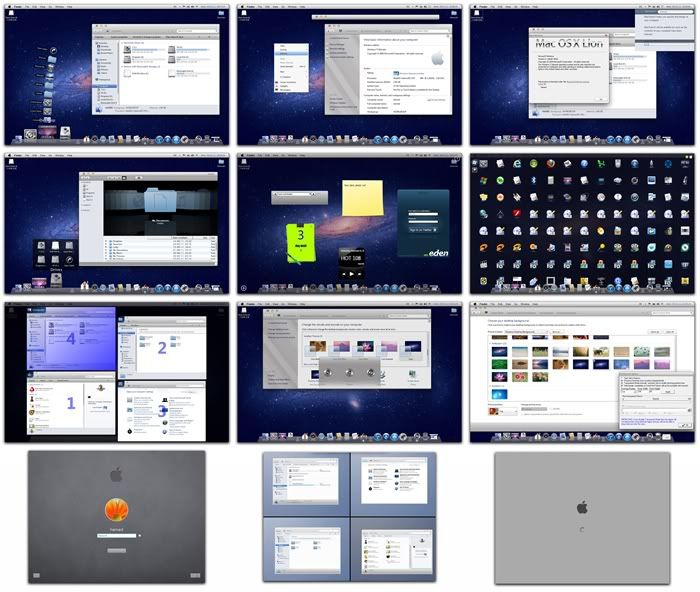
MAC OSX LION SKINPACK for Windows 7

Sebenernya Aku Mau Vakum Dlu Untuk 1 Minggu...
Tapi Rasanya Kasian Kalo Gak Update Blog...
Ya Udah Aku Kepikiran Buat Update SkinPack Aja
Selama 1 Minggu Ini...

MAC OSX LION SKINPACK for Windows 7, Skinpack
Ini Di Buat Mirip Banget Kayak MAC OSX LION...

Mau Liat Penampakannya???

MAC OSX LION SKINPACK Ini Gak Butuh System Req Yang Macem2 Kok...
Cukup Segini Aja:

  • OS : Windows 7, Windows 7 SP1[All Version]

MAC OSX LION SKINPACK Ini Udah Ada Program Built-in nya Gitu Deh...
Mari Di Lihat List Program MAC OSX LION SKINPACK
  • Resource Hacker 3.6
  • Moveex 1.0 
  • Universal Theme Patcher 1.5.0.22 
  • Win7BootUpdater v0 Beta 1 
  • Finderbar 1.5 & MacSearch 1.4
  • XLefty 1.0 
  • RocketDock 1.3.5 
  • DeskDrive 1.8.2 
  • DesktopCoral 1.10 
  • tClock 2010 
  • Finger 
  • Winroll 2.0 
  • myBoard 1.1 
  • Switcher 2.0 
  • UberIcon 1.0.4 
  • Y'z Shadow 2.3 beta3 
  • MySapce 1.0 
  • Lion Theme
  • Lion Glass Theme 
  • Lion Full Glass Theme
  • Skin Pack Toolbar

Nah, Sekarang Link Download nya Nih,

MAC OSX LION SKINPACK Online Installer With Auto Fix Bug (Recomended)
32 Bit: Download
64 Bit: Download

MAC OSX LION SKINPACK Offline Installer
32 Bit: Download
64 Bit: Download

Selamat Menikmati MAC OSX LION SKINPACK for Windows 7 !!!

Minggu, 18 Desember 2011

Android Skin Pack 2.0

Kamu Suka Menghias Desktop?
Atau Kamu Suka Dengan Android?
Skin Pack ini Pasti Pas Banget Buat Kamu

Android Skin Pack 2.0 Ini
Merubah Desktop Kita Bahkan Seluruh Sistem Kita
Menjadi Seperti Tampilan Android

Gak Percaya? Cekidot


Tuh Liat, Yang Di Atas Sebenernya Ada Lagi...
Tapi Aku Hapus Biar Gak Lag Pas Maen Game

Trus Pas Klik Icon Apa Aja...
Ada Animasinya, Keren Banget Loh Animasi
Dari Android Skin Pack 2.0 Ini

Mau Tau Apa Lagi Yang Android Skin Pack 2.0 Kasih?
Coba Kamu Restart PC Or Lepy Kamu...
Pasti Ada Gambar Android nya...

Pokoknya Keren Deh Android Skin Pack 2.0 Ini..
Udah Gak Sabar Ya Pengen Coba Android Skin Pack 2.0 nya?

Langsung Klik Link Download Android Skin Pack 2.0 nya aja deh...
http://www.zshare.net/download/97514837199618d2/

Selamat Menikmati Android Skin Pack 2.0 !!!
Oh Iya... Jangan Lupa Request Lagi Di Sini Ya...

Minggu, 11 Desember 2011

Ubuntu 11.10

Ubuntu 11.10

Adalah Operating System Yang Bagus Loh!
Ubuntu Ini Katanya...
Akan gratis Untuk Selamanya!
Ubuntu Tersedia Dalam 24 Pilihan Bahasa

N Berikut Ini Fitur - Fitur Yang Di Berikan Oleh Ubuntu...


Cekidot


The launcher

Get easy access to your favourite tools and applications with our lovely new launcher. You can hide and reveal it, add and remove apps and keep track of your open windows.

The dash

Our new dash offers a great way to get to your shortcuts and search for more apps and programs. So you can get fast access to your email, music, pictures and much more.


Workspaces

Our handy workspaces tool gives you a really easy way to view and move between multiple windows and applications.


Secure

You can surf in safety with Ubuntu – confident that your files and data will stay protected. A built-in firewall and virus protection come as standard. And if a potential threat appears, we provide automatic updates which you can install in a single click. You get added security with AppArmor, which protects your important applications so attackers can’t access your system. And thanks to Firefox and gnome-keyring, Ubuntu helps you keep your private information private. So whether it’s accessing your bank account or sharing sensitive data with friends or colleagues, you’ll have peace of mind when you need it the most.

Compatible

Ubuntu works brilliantly with a range of devices. Simply plug in your MP3 player, camera or printer and you’ll be up and running straight away. No installation CDs. No fuss. And it’s compatible with Windows too! So you can open, edit and share Microsoft Office documents stress-free.

Fast

Ubuntu loads quickly on any computer, but it's super-fast on newer machines. With no unnecessary programs and trial software slowing things down, booting up and opening a browser takes seconds. Unlike other operating systems that leave you staring at the screen, waiting to get online. And Ubuntu won’t grow sluggish over time. It’s fast. And it stays fast.

Accessible

Accessibility is central to the Ubuntu philosophy. We believe that computing is for everyone regardless of nationality, race, gender or disability. Fully translated into 25 languages, Ubuntu also includes essential assistive technologies, which are, of course, completely free.


Kalo masih Belom Ngerti Tanya Aja Ya...
Semoga Terbantu ^_^

Jumat, 07 Oktober 2011

Mengganti Background & Themes Windows 7 Starter

Gampang Nih Caranya...
Tinggal Install Sopwer Ini Aja...

http://adf.ly/355tB
Pass: Follow Dulu Labku (http://drw-lab.blogspot.com) Untuk Mendapatkan Passwordnya

Moga Berguna

Jumat, 15 Juli 2011

Mengganti Background Windows 7 Starter

Kamu Gak Bisa Ganti Background Windows7 Kamu???
Mau Tau Kenapa Gak Bisa???


Kamu Gak Bisa Ganti Background Kamu Karena Kamu
GAK PUNYA SOFTWARE INI Hehehhe
Canda dikit...

Itu Karena Windows Sendiri Menghilangkan Fitur Personalize
Khusus Di Hilangkan Pada Windows7

Cara Pertama Adalah Dengan Meng-upgrade Windows7 Kamu
ke Versi Yang Lebih Tinggi Contohnya Windows7 Ultimate

Cara Yang Ke Dua Adalah Dengan Menggunakan Software yang satu ini
Software Ini Buatan Orang Perancis Kayaknya n Aku juga lupa situs resminya

Software ini bisa mengaktifkan
fitur personalize di windows7 Starter kamu

Download: http://www.ziddu.com/download/15696753/W7StarterBackgroundChanger.rar.html
Password: Follow Dulu Labku (http://drw-lab.blogspot.com) Untuk Mendapatkan Passwordnya

Cara Makenya Nih Gampang Banget Tinggal
Di Install Terus Klik Kanan Dan Klik Pilihan Personalize


Udah Ya Males Ngetik lagi Moga Berguna....